
Know your games.
Share the games or apps you use, your monitor resolution and refresh rate, and the budget you want to stay within.
Buying guides
Plan the upgrade around your whole PC. Start with your games, budget, power supply, and available case space, then message us with the details.
Share the games or apps you use, your monitor resolution and refresh rate, and the budget you want to stay within.
Send your CPU, RAM, motherboard, and case model. Check the exact card’s length, thickness, display outputs, and required power connectors before ordering.
Send a clear photo of the PSU label, including its brand, exact model, and wattage. Wattage alone does not confirm compatibility or PSU quality.
GPU + PSU / QUICK REFERENCE
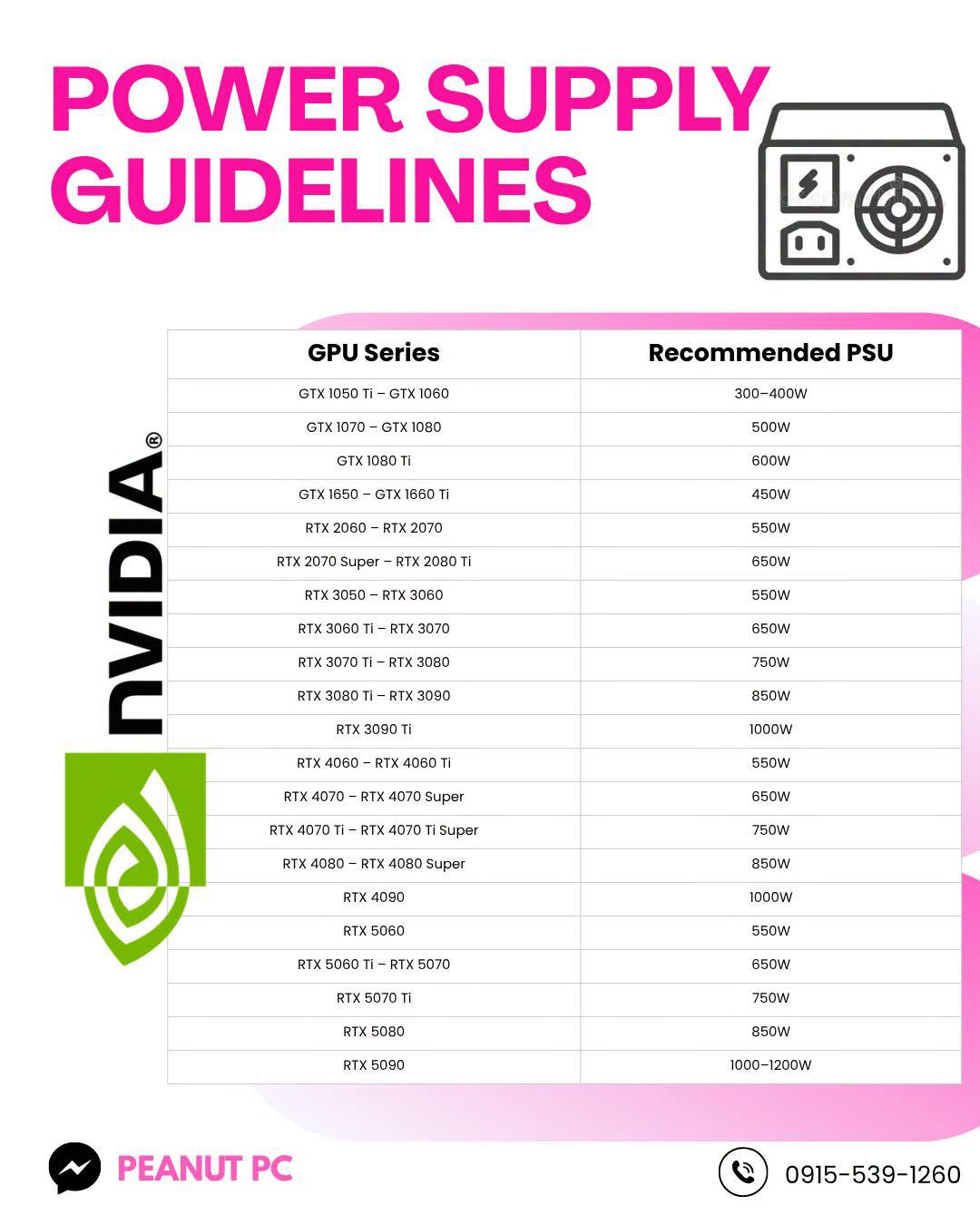
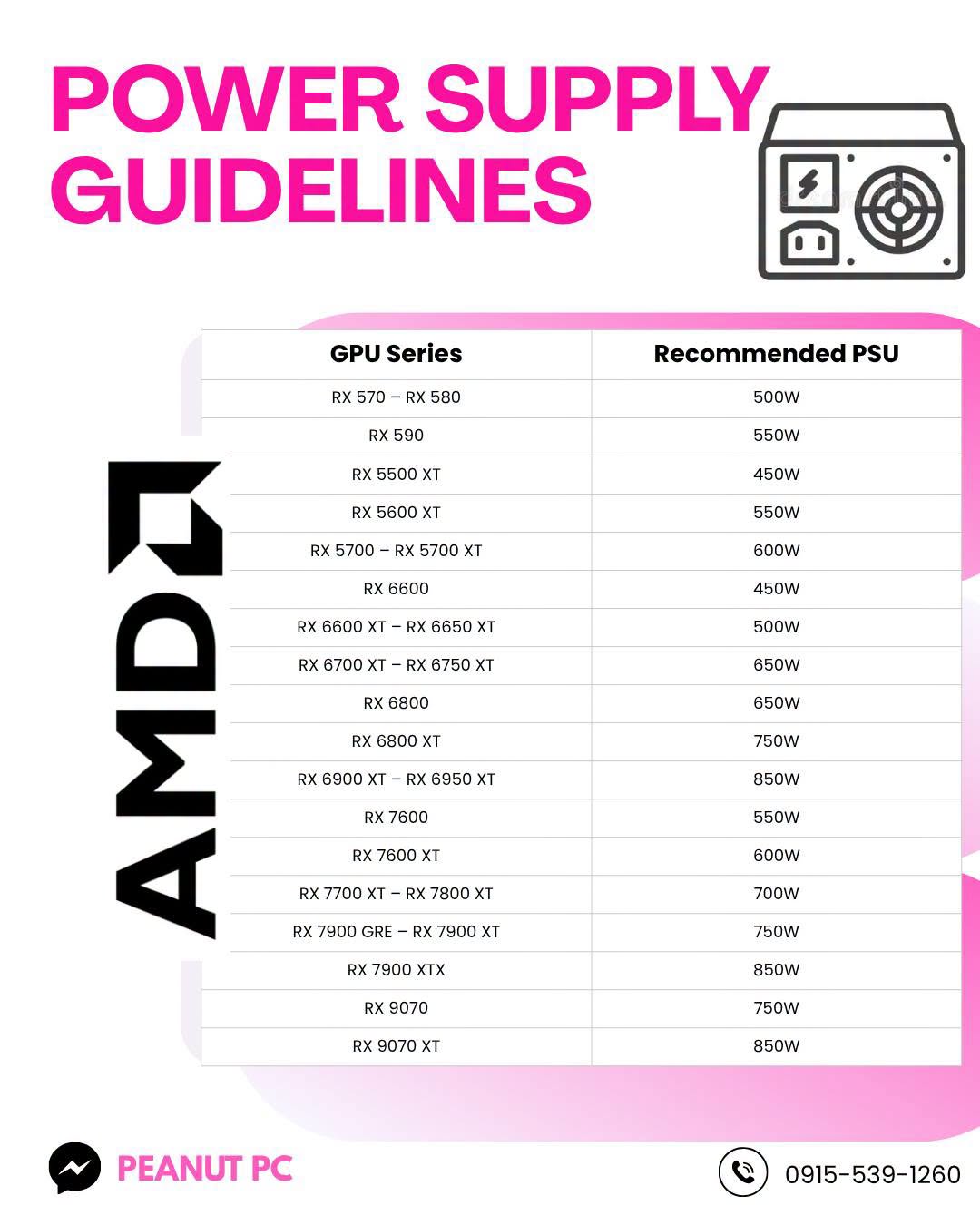
The figures below reproduce our published PSU infographics. They are a starting point for discussion, not an automatic compatibility approval.
For a model within a listed range, choose that range. If your model is not listed, message us.
Choose a card to see the figure in our chart.
Board-partner requirements, CPU power use, PSU quality, connectors, and the rest of your build can change what is appropriate. A model name or a wattage figure alone does not confirm a safe match. Send us your exact PSU model and PC specifications before ordering.
Our ordering guide refers buyers to the PSU’s List and Cultists Network tier lists, prefers Tier A–C units, and advises against Tier D–F or generic PSUs. It lists MSI, Corsair, and FSP as examples to consider; the exact model still needs checking. Incompatible or unsuitable power equipment may void the shop warranty.
| GPU model or series | Guide PSU wattage |
|---|---|
| GTX 1050 Ti – GTX 1060 | 300–400W |
| GTX 1070 – GTX 1080 | 500W |
| GTX 1080 Ti | 600W |
| GTX 1650 – GTX 1660 Ti | 450W |
| RTX 2060 – RTX 2070 | 550W |
| RTX 2070 Super – RTX 2080 Ti | 650W |
| RTX 3050 – RTX 3060 | 550W |
| RTX 3060 Ti – RTX 3070 | 650W |
| RTX 3070 Ti – RTX 3080 | 750W |
| RTX 3080 Ti – RTX 3090 | 850W |
| RTX 3090 Ti | 1000W |
| RTX 4060 – RTX 4060 Ti | 550W |
| RTX 4070 – RTX 4070 Super | 650W |
| RTX 4070 Ti – RTX 4070 Ti Super | 750W |
| RTX 4080 – RTX 4080 Super | 850W |
| RTX 4090 | 1000W |
| RTX 5060 | 550W |
| RTX 5060 Ti – RTX 5070 | 650W |
| RTX 5070 Ti | 750W |
| RTX 5080 | 850W |
| RTX 5090 | 1000–1200W |
| GPU model or series | Guide PSU wattage |
|---|---|
| RX 570 – RX 580 | 500W |
| RX 590 | 550W |
| RX 5500 XT | 450W |
| RX 5600 XT | 550W |
| RX 5700 – RX 5700 XT | 600W |
| RX 6600 | 450W |
| RX 6600 XT – RX 6650 XT | 500W |
| RX 6700 XT – RX 6750 XT | 650W |
| RX 6800 | 650W |
| RX 6800 XT | 750W |
| RX 6900 XT – RX 6950 XT | 850W |
| RX 7600 | 550W |
| RX 7600 XT | 600W |
| RX 7700 XT – RX 7800 XT | 700W |
| RX 7900 GRE – RX 7900 XT | 750W |
| RX 7900 XTX | 850W |
| RX 9070 | 750W |
| RX 9070 XT | 850W |
BEFORE YOU PAY
Confirm the model, brand, condition, included items, current price, and whether that specific unit is available.
Check case clearance, power connectors, display connections, and your current power supply with us.
Confirm your address or pickup plan, charges, expected timing, any reservation fee or down payment, and payment instructions.
Read the 14-day shop warranty, keep your original packaging, proof of purchase, and warranty slip, and inspect the card when you receive it.
LET’S BUILD YOUR NEXT CHAPTER
Tell us your budget, your PC specs, and what you want to play. We’ll help you check the options.